Polish, translate, rewrite, or run custom workflows — all on one keystroke.
Rewrite
anywhere on your Mac.
Hit one shortcut. WriterBar rewrites your selected text with AI, or instantly pastes any saved template or signature — anywhere you write. No copy, no paste, no app switching.
- Fix grammar & tone
- Translate text
- Custom AI actions
- Snippets, templates & signatures
See WriterBar in action
Watch every built-in action and the full keyboard flow in motion.
Everything you need to write faster
A focused toolset that disappears into your workflow.
Quick WriterBar
Press ⌥Space anywhere to open the Command Palette and instantly search, run, or edit any action or snippet.
Actions and snippets, ready to use
AI actions to fix, improve, shorten, expand, translate, and summarize — plus signatures, templates, and reusable snippets, all one hotkey away. Add your own in seconds.
Run any action, right where you type
Select text in any app, pick an action, and watch the rewrite stream in. Accept it and your text is replaced in place — no copying, no switching windows.
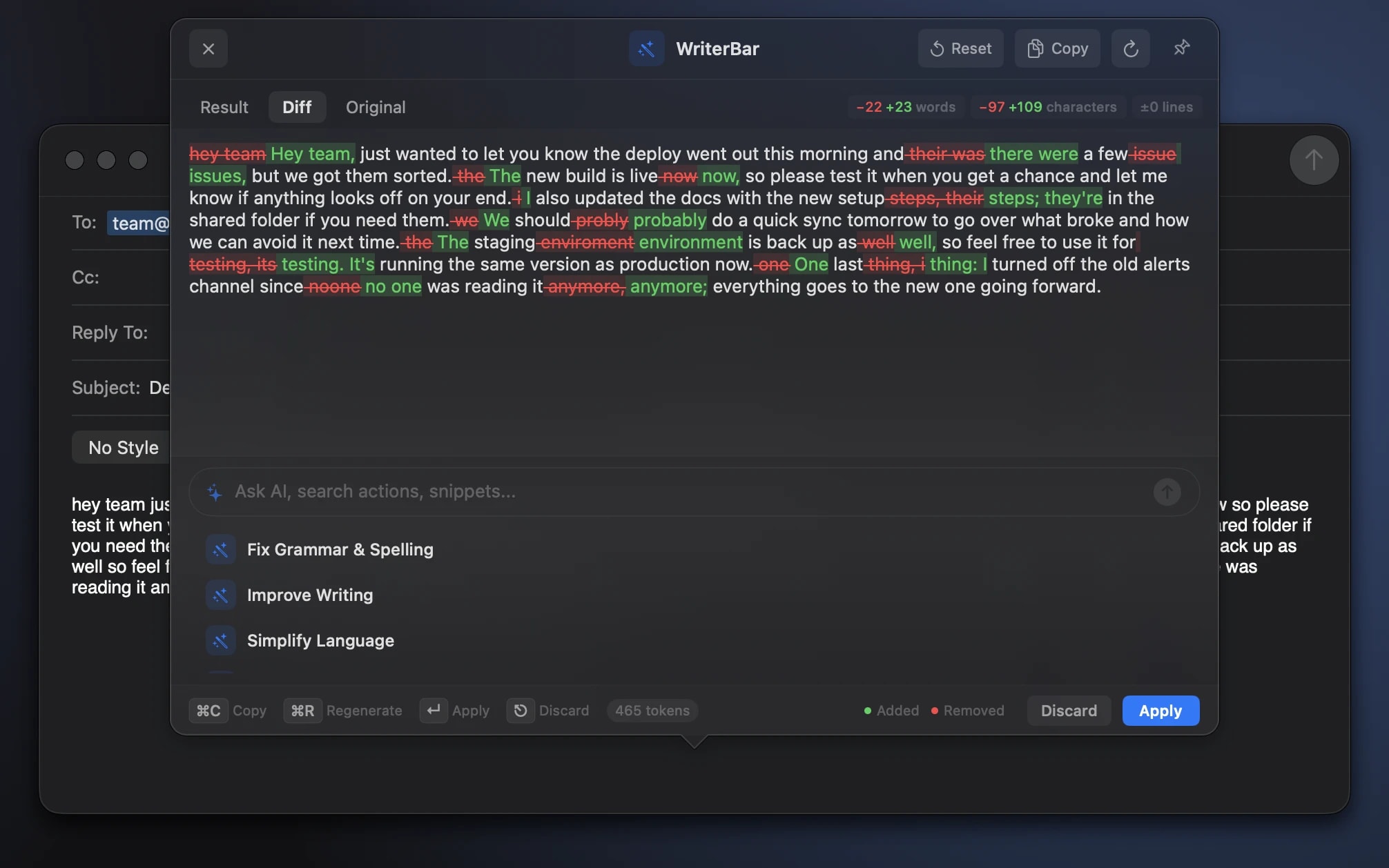
Diff & History
See exactly what changed before applying. Browse past rewrites. Re-run any action on the same selection.
Custom Snippets
Save signatures, boilerplate, prompts — with your own variables filled in automatically. Paste any snippet with a hotkey or from the menu bar, synced across devices.
Ask WriterBar anything
Not every edit fits a preset. Describe what you want in your own words and WriterBar rewrites the selection to match — then refine it again without leaving the panel.
Custom AI Workflows
Write any prompt, pick an icon, assign a hotkey. WriterBar runs your custom actions exactly like the built-ins — from PR descriptions to standup updates, every workflow lives on one keystroke.
Multi-Provider AI
Use our built-in model, or bring your own key for any major AI provider — including OpenRouter for 300+ models. Switch any time.
Actions and snippets, ready to use.
AI actions to fix, improve, shorten, expand, translate, and summarize — plus signatures, templates, and reusable snippets, all one hotkey away. Add your own in seconds.
Fix Grammar & Spelling
Writing
Tap for details
Before
their going too the store
After
They're going to the store.
Improve Writing
Writing
Tap for details
Before
this is good i think
After
I believe this is solid.
Make Shorter
Writing
Tap for details
Before
In order to facilitate
After
To enable
Make Professional
Tone
Tap for details
Before
hey can u send the file
After
Could you please send the file?
Summarize
Productivity
Tap for details
Before
500 words of meeting notes…
After
Three bullet-point takeaways
Translate
Productivity
Tap for details
Before
Hello world
After
Hola mundo
Explain This
Productivity
Tap for details
Before
ROI
After
Return earned on money spent.
Write a Reply
Communication
Tap for details
Before
Can we move to Thursday?
After
Thursday works — I’ll resend the invite.
Signature
Contact Info
Tap for details
Abbreviation
;sig
Pastes
Kind regards, Kishan Raja Founder, WriterBar
Meeting Invite
Templates
Tap for details
Abbreviation
;invite
Pastes
When: Friday at 10:00 Where: …
Out of Office
Templates
Tap for details
Abbreviation
;ooo
Pastes
I’m out of the office until Monday…
Zoom Link
Communication
Tap for details
Abbreviation
;zoom
Pastes
https://zoom.us/j/0000000000
Made for the writing you do every day.
Founders, developers, students, writers — real workflows for every role you play. Polish a cold email, outline a blog post, format a bug report, paraphrase a citation. Grab a preset or build your own in seconds.
- Marketing
Polish a Tweet
Sharpen a draft into a punchy, scroll-stopping post.
- Marketing
Ad Copy Tighten
Cut headline copy down to five words that actually convert.
- Content
Blog Post Outline
Turn a one-line idea into a structured outline you can write from.
- Content
Newsletter Intro
Hook readers in the first line of your weekly newsletter.
- Marketing
LinkedIn Post
Turn plain updates into engaging LinkedIn posts that land.
- Marketing
Landing Page Hook
A one-sentence value prop that stops the scroll.
- Content
Podcast Show Notes
Timestamps and takeaways generated from a transcript.
- Marketing
Case Study Draft
Bullet a customer win into a full case study story.
- Marketing
Polish a Tweet
Sharpen a draft into a punchy, scroll-stopping post.
- Marketing
Ad Copy Tighten
Cut headline copy down to five words that actually convert.
- Content
Blog Post Outline
Turn a one-line idea into a structured outline you can write from.
- Content
Newsletter Intro
Hook readers in the first line of your weekly newsletter.
- Marketing
LinkedIn Post
Turn plain updates into engaging LinkedIn posts that land.
- Marketing
Landing Page Hook
A one-sentence value prop that stops the scroll.
- Content
Podcast Show Notes
Timestamps and takeaways generated from a transcript.
- Marketing
Case Study Draft
Bullet a customer win into a full case study story.
- Writing
Tone Switch
Flip between formal and casual without losing the meaning.
- Marketing
Headline Generator
Punchy headline options for the piece you just wrote.
- Writing
Tweet → LinkedIn
Adapt a tweet into a long-form LinkedIn post.
- Sales
Cold Email Polish
Strip the corporate-speak. Make your outreach sound human.
- Sales
Discovery Questions
Generate five open-ended discovery questions for your next call.
- Support
Customer Reply
Warm, professional response with empathy in the right places.
- Sales
Follow-up Nudge
A polite re-engagement email after silence.
- Support
Refund Explanation
Clear, kind refund clarification that de-escalates.
- Writing
Tone Switch
Flip between formal and casual without losing the meaning.
- Marketing
Headline Generator
Punchy headline options for the piece you just wrote.
- Writing
Tweet → LinkedIn
Adapt a tweet into a long-form LinkedIn post.
- Sales
Cold Email Polish
Strip the corporate-speak. Make your outreach sound human.
- Sales
Discovery Questions
Generate five open-ended discovery questions for your next call.
- Support
Customer Reply
Warm, professional response with empathy in the right places.
- Sales
Follow-up Nudge
A polite re-engagement email after silence.
- Support
Refund Explanation
Clear, kind refund clarification that de-escalates.
- Founder
Pitch Deck Bullets
Tighten a slide into five sharp, investor-ready bullets.
- Product
User Story Generator
Convert a feature idea into well-formed user stories with criteria.
- Product
Release Notes
Turn a raw changelog into customer-friendly release notes.
- Dev
Bug Report
Format a clear, reproducible bug report with steps and expected.
- Dev
PR Description
Generate a polished PR description from a list of commits.
- Dev
Commit Message
A conventional commit message from a diff, ready to push.
- Dev
README Polish
Format your README with clear sections and a strong intro.
- Dev
API Docs Polish
Clean up rough API notes into publish-ready reference docs.
- Founder
Pitch Deck Bullets
Tighten a slide into five sharp, investor-ready bullets.
- Product
User Story Generator
Convert a feature idea into well-formed user stories with criteria.
- Product
Release Notes
Turn a raw changelog into customer-friendly release notes.
- Dev
Bug Report
Format a clear, reproducible bug report with steps and expected.
- Dev
PR Description
Generate a polished PR description from a list of commits.
- Dev
Commit Message
A conventional commit message from a diff, ready to push.
- Dev
README Polish
Format your README with clear sections and a strong intro.
- Dev
API Docs Polish
Clean up rough API notes into publish-ready reference docs.
Works inside every Mac app you use.
Anywhere you can type, WriterBar can rewrite. One shortcut works in every Mac app — no copy-paste, no window switching, no break in your flow.
- SlackChat
- MailEmail
- NotionDocs
- ChromeBrowser
- GmailEmail
- WordDocs
- DiscordChat
- Google DocsDocs
- TeamsChat
- SafariBrowser
- OutlookEmail
- WhatsAppChat
- BraveBrowser
- ExcelOffice
- FirefoxBrowser
- SignalChat
- ArcBrowser
- GitHubCode
- GitLabCode
- Sublime TextCode
- NeovimCode
- iTerm2Terminal
- SlackChat
- MailEmail
- NotionDocs
- ChromeBrowser
- GmailEmail
- WordDocs
- DiscordChat
- Google DocsDocs
- TeamsChat
- SafariBrowser
- OutlookEmail
- WhatsAppChat
- BraveBrowser
- ExcelOffice
- FirefoxBrowser
- SignalChat
- ArcBrowser
- GitHubCode
- GitLabCode
- Sublime TextCode
- NeovimCode
- iTerm2Terminal
- VS CodeCode
- FigmaDesign
- XSocial
- LinkedInSocial
- MessagesChat
- XcodeCode
- JiraTasks
- IntelliJ IDEACode
- ZedCode
- BitbucketCode
- Android StudioCode
- ObsidianNotes
- TelegramChat
- AsanaTasks
- LinearTasks
- WordPressWriting
- FacebookSocial
- RedditSocial
- TrelloTasks
- SubstackNewsletter
- ZoomMeetings
- MediumWriting
- VS CodeCode
- FigmaDesign
- XSocial
- LinkedInSocial
- MessagesChat
- XcodeCode
- JiraTasks
- IntelliJ IDEACode
- ZedCode
- BitbucketCode
- Android StudioCode
- ObsidianNotes
- TelegramChat
- AsanaTasks
- LinearTasks
- WordPressWriting
- FacebookSocial
- RedditSocial
- TrelloTasks
- SubstackNewsletter
- ZoomMeetings
- MediumWriting
Pick your model. Keep your privacy.
WriterBar ships with a built-in model that just works. Prefer your own? Connect a key for any major AI provider — or stay fully on-device with Apple Intelligence.
Anthropic
Claude Opus · Sonnet · Haiku
Nuanced tone and long-form rewrites.
OpenAI
GPT-5 · GPT-4o · o-series
Fast, versatile everyday writing.
Google Gemini
Gemini Pro · Flash
Huge context for big documents.
OpenRouter
300+ models, one key
Llama, Grok, Qwen, DeepSeek and more.
Apple Intelligence
On-device foundation models
Runs on your Mac. Text never leaves it.
With your own key, WriterBar lists every model your key unlocks — new releases show up automatically.
Your text is never stored
Selections stream to the provider and back — nothing logged, nothing kept. With your own key, requests go straight to the provider and never touch our servers.
Start rewriting smarter.
Every AI action, custom workflow, and saved template — one keystroke away, anywhere on your Mac.
- Free plan included
- No credit card required
- macOS 14+